Stop debugging AI agents in the dark.
Point your agent at localhost. Every LLM call becomes a node in a live trace tree - with caching, mocking, and zero data leaving your machine.
Currently alpha — limited seats. Get access now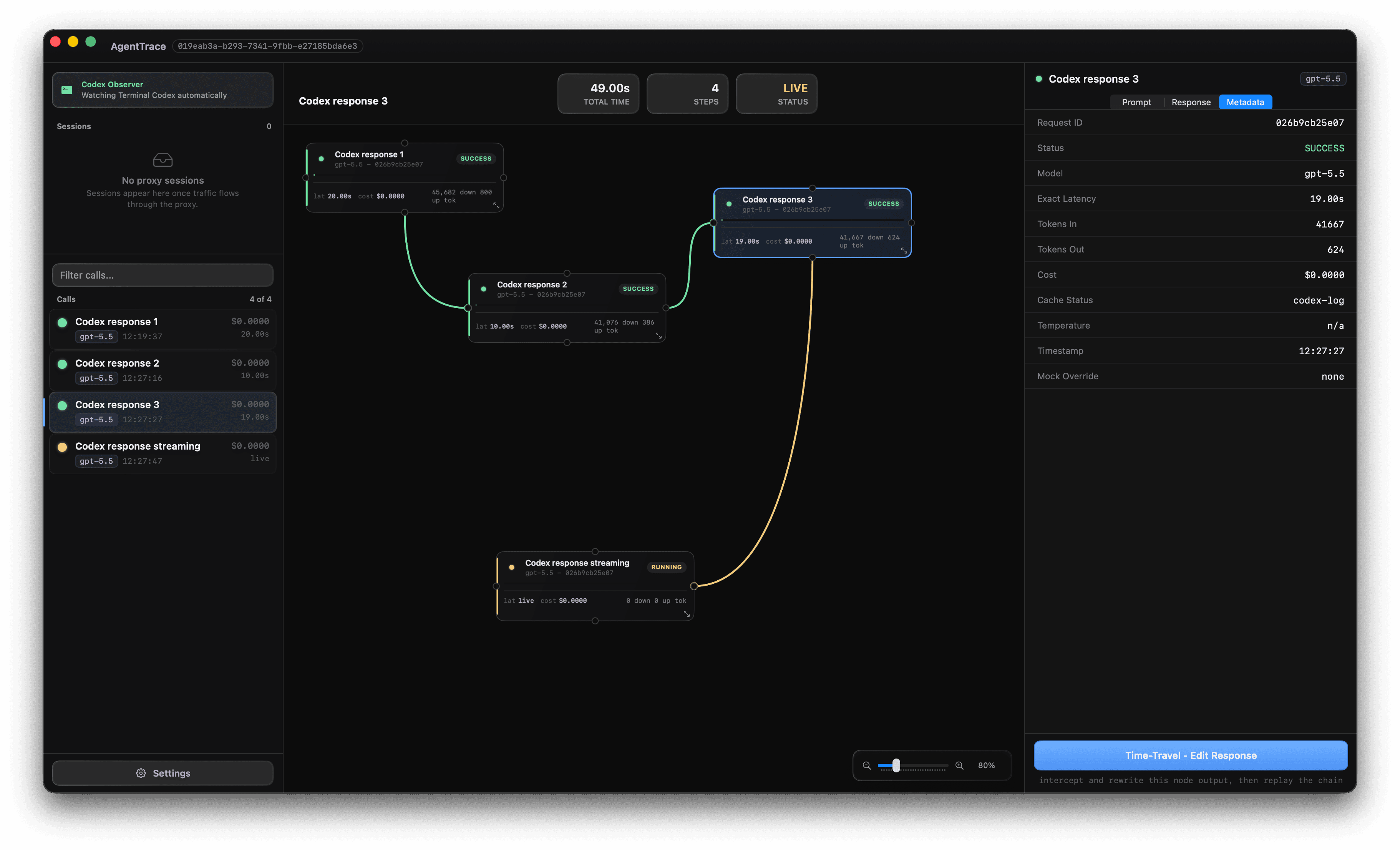
Sits transparently in front of any provider
Every agent run, drawn as a tree you can read.
Messy terminal logs become a hierarchical node graph in real time. Each LLM request is a node - color-coded by what actually happened.
The Visual Tree Canvas
Every LLM request becomes a node in a graph. Nested tool-calls, retries, and sub-agents nest automatically - so the shape of your agent's reasoning is finally something you can see, not scroll past.
Local Response Cache
Identical prompts return instantly from local cache. Iterate on downstream logic without re-running - or re-paying for - upstream calls. $0.0000 per cached hit.
Time-Travel Mocking
Your agent failed at step 4. Rewrite that node's output and replay from there - no re-running the full chain, no wasted tokens. Fix the exact break, not the whole pipeline.
Air-Gapped Privacy
API keys live encrypted in the macOS Keychain. Prompts, responses, and traces stay in a local SQLite database that never leaves the machine. Nothing is phoned home - verify it yourself with Little Snitch.
Click a capability. Watch the inspector react.
The right pane is the real app's inspector. Pick a feature on the left - it switches state exactly like clicking a node in Tether.
{
  "intent": "order_status",
  "confidence": 0.97,
  "entities": {
    "sentiment": "calm",  <- mocked
    "order_id": "4471"
  }
}No SDK. Just change one base URL.
Tether is a transparent proxy. Point your client at localhost and every call shows up in the canvas - no code instrumentation, no decorators.
Point the base_url
Swap your client's endpoint for the local proxy. Works with any OpenAI-compatible SDK.
client = OpenAI(
base_url="http://localhost:8080/v1"
)
Run your agent
Run anything as usual. Every request is intercepted, cached, and streamed into the tree live.
$ python agent.py
# -> 5 calls traced
Inspect & replay
Open the canvas, click the node that broke, rewrite its output, and replay forward. See exactly where your agent fails - without re-running the whole chain.
opt+cmd+R replay from node
cmd+K mock response
Everything you need to know.
Is Tether free?
Yes. Tether is free during the alpha period and the core proxy is open source. No credit card or account required.
Does Tether send my prompts or API keys anywhere?
No. Tether is fully air-gapped. Your prompts, responses, and API keys never leave your Mac. API keys are stored encrypted in the macOS Keychain and are never written to disk in plain text.
How does Tether intercept LLM calls without changing my code?
Tether runs a local HTTP proxy on your machine. You point your AI client's base_url at http://localhost:8080/v1 — that's the only change. Tether transparently forwards every request to the real provider and records the full request/response pair locally.
Which LLM providers and frameworks does Tether support?
Tether supports OpenAI, Anthropic (Claude), Ollama, LM Studio, and any provider that accepts an OpenAI-compatible base_url. It works with LangChain, LangGraph, LlamaIndex, and any SDK with a configurable endpoint.
How is Tether different from LangSmith or Weights & Biases?
LangSmith and W&B send your traces to cloud servers. Tether keeps everything on your machine — there is no cloud, no account, and nothing leaves your Mac. It's designed for developers who can't or won't send production prompts to third-party services.
What is time-travel mocking?
Time-travel mocking lets you click any past node in the agent trace, edit its response JSON, and replay the entire chain from that point forward — without re-running earlier steps or spending tokens. You can test how your agent would behave with a different LLM output in seconds.
Why not just use print() or logging?
Logging shows you what happened. Tether shows you why. You see the exact point where your agent failed, what response broke it, and you replay with a fix in seconds—no re-running the whole chain.
Can I use this with production code?
Yes. It's a local proxy—your real code doesn't change. Use it locally for debugging, or keep it running. Tether only stores traces locally, never sends anything anywhere.
How much money does caching actually save?
It depends on your agent. If you're iterating on prompt logic and re-running the same retrieval steps, caching saves you 50-90% of API spend while you debug. Each cached hit costs $0.0000.
Will Tether work with my stack?
If your SDK uses a configurable base_url (OpenAI SDK, LangChain, LangGraph, LlamaIndex, Anthropic SDK), it works. One line change. If you use a different provider (Claude API via REST, custom setup), Tether still works—it's a transparent proxy.
Does Tether add latency to my agent?
Negligible. Tether runs locally on your Mac. The only overhead is the proxy hop, which is <1ms. Real LLM calls are the bottleneck, not Tether.
Can I share traces with my team?
Not yet. Each developer runs their own Tether instance locally. Export as JSON is coming in a later release.
Tell me what breaks first.
Alpha users shape the next build. Send the bug, missing workflow, or reason you would not use this yet.
Trace your first agent
in under a minute.
Free during alpha. Get the signed DMG the moment it's ready - no account, no cloud, no strings.
⚡ Limited alpha slots. Mac only for now.